Posts

Showing posts with the label router

How to Configure Samba Server on Openwrt
Image
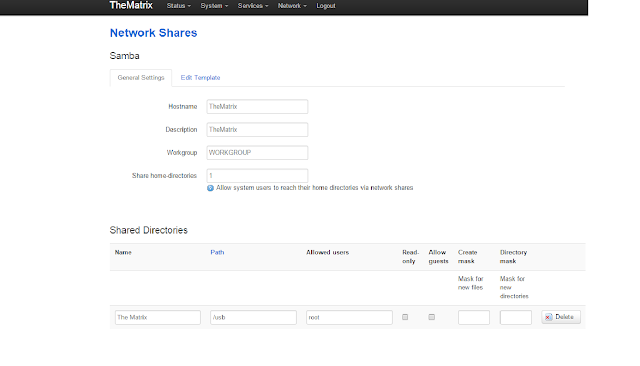
Below are the steps to Configure Samba in Openwrt This is a setup to configure Samba Server for root user (you need to change some of the steps for using with other users). 1. Update the repositories:     opkg update 2a. Install Samba:       opkg install luci-app-samba shadow-useradd      (If configuring for root user only no need of   shadow-useradd package) 3. Start Samba and have it start at boot:      /etc/init.d/samba enable      /etc/init.d/samba start 4. Enable the user for Samba:      smbpasswd -a root 5. Now open your router's page and goto Service -> Network Share      Here you can set Hostname, Description, Workgroup, and Home-directories to share.           After that you have to add       Name for shared folder.      Path is your storage device mo...

How to Configure Transmission on Openwrt

This is for Command line What you'll need ============ 1: An OpenWrt router. 2: And obviously an internet connection. Notes ===== 1. Update the repositories: opkg update 2. Choose which Transmission package to install: opkg list transmission* 3. I will be demonstrating the transmission-web which also relies on the transmission-daemon: opkg install transmission-web 4. Edit the configuration file: vi /etc/config/transmission option enabled 1                             option download_dir '/mnt/usb1/downloads/transmission/do­ne option rpc_authentication_required true option rpc_bind_address '0.0.0.0' option rpc_enabled true option rpc_password 'password' option rpc_port 9091 option rpc_url '/transmission/' option rpc_username 'username' option rpc_whitelist '127.0.0.1,192.168.2.*' option rpc_whitelist_enabled true 5. Reload the Transmission daemon when done making changes to the conf...