Posts

Moto G 2nd Gen working slow?

So, I have been using Moto G 2014 for months now. When Motorola launched Moto G 2nd Gen, it came with Android Kitkat OS. With Android Kitkat, Performance was pretty good, with little to no lag. Android Kitkat worked flawlessly for me, with normal usage. On heavy use, Moto used to lag/hang many times, but considering price and hardware specs this phone is not made for heavy use.  After few months Google released Android Lollipop, everyone was excited about new Android OS with some new features. One major change made by Google in Android Lollipop is ART runtime. ART is new runtime time, that introduced AOT (Ahead of Time compilation) which reduces Memory usage and improves app performance. Because of AOT app size increased, using more internal storage. With this new Android OS, comes a new design called Material design (which I love). Motorola, released android lollipop for Moto G 2nd Gen with few bug fixes. But still some major bugs were not fixed which lead to sudden slowing ...

OpenWrt vs DD-Wrt. Which one to use?

Image
Why use third party firmware? Nowadays, everyone is using routers in their home and offices. The router, you use are made for home/office purpose, able to manage a handful of devices. Default firmware provided with the router may have limited features which otherwise could be useful if configurable or comes with the bug (which does not get fixed quickly), stranding you to live with it. This also increases security risk for your home network. Imagine a situation, where an outsider is able to connect to your home network and eat your bandwidth or delete data from your home devices or stealing contacts from your phone.  For me, the reason behind using a third party open source firmware is mainly performance, complete control of the network, the new version is made available faster and they can run for days without restarting the router. Installing third party firmware gives you a granular level of control along with business level features, utilizing hardware's max...

How to Configure Samba Server on Openwrt

Image
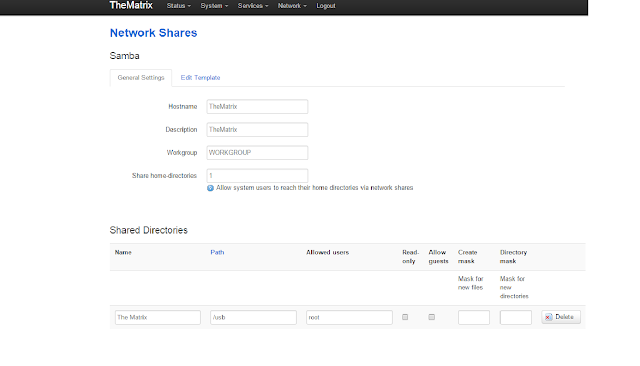
Below are the steps to Configure Samba in Openwrt This is a setup to configure Samba Server for root user (you need to change some of the steps for using with other users). 1. Update the repositories:     opkg update 2a. Install Samba:       opkg install luci-app-samba shadow-useradd      (If configuring for root user only no need of   shadow-useradd package) 3. Start Samba and have it start at boot:      /etc/init.d/samba enable      /etc/init.d/samba start 4. Enable the user for Samba:      smbpasswd -a root 5. Now open your router's page and goto Service -> Network Share      Here you can set Hostname, Description, Workgroup, and Home-directories to share.           After that you have to add       Name for shared folder.      Path is your storage device mo...

Seagate Backup plus External Desktop Drive Review

Image
The Seagate Backup Plus Desktop Drive is one of the best USB 3.0 external drive you can buy. In The Box In the Box, you will find Seagate Backup Plus drive along with power adapter (it comes with different sockets plug) and some instruction on using backup plus software for auto backup. Here in India, it comes with 3 Years of warranty. Looks wise Looks wise, on the bottom, it has blue color while all other sides are black. On side and bottom, it has small ventilation holes (BTW they are arranged beautifully)  for heat to dissipate. It is approx. 179 x 117 x 41 mm in size and it weighs 860 grams. It has a 3.5 inch HDD inside and requires external power.  This drive can support up to 8 TB.  The outer case is slightly larger than 3.5 inch Hard Drive. On the front, there is a micro-USB port and power port. What Comes in Drive? Out of the Box, Drives come preformatted in NTFS for Windows also it includes NTFS drives for MAC. There ...

How to Configure Transmission on Openwrt

This is for Command line What you'll need ============ 1: An OpenWrt router. 2: And obviously an internet connection. Notes ===== 1. Update the repositories: opkg update 2. Choose which Transmission package to install: opkg list transmission* 3. I will be demonstrating the transmission-web which also relies on the transmission-daemon: opkg install transmission-web 4. Edit the configuration file: vi /etc/config/transmission option enabled 1                             option download_dir '/mnt/usb1/downloads/transmission/do­ne option rpc_authentication_required true option rpc_bind_address '0.0.0.0' option rpc_enabled true option rpc_password 'password' option rpc_port 9091 option rpc_url '/transmission/' option rpc_username 'username' option rpc_whitelist '127.0.0.1,192.168.2.*' option rpc_whitelist_enabled true 5. Reload the Transmission daemon when done making changes to the conf...

Arctic Silver 5 Thermal Compound Review

Image
With high performance and overclocking cooling demand has increased and they need to be cooled to maintain performance and stability, with heatsink and water cooling blocks can achieve higher cooling but without  best performing thermal compound it is of no use. Arctic Silver 5   is one of the latest, most advanced, and best performing thermal compound available on the market. About packaging There is no packing to syringe which is unexpected from such premium and high-quality product. About Arctic Silver 5 Arctic Silver has high density contains over 88 % thermally conductive filler by weight. along that, it has micronized silver and other things. Arctic Silver 5 does not contain any silicone. The suspension fluid is a proprietary mixture of advanced polysynthetic oils that work together to provide three distinctive functional phases Review I used this thermal compound on my old Intel Core 2 Duo Processor which was running hotter wh...